
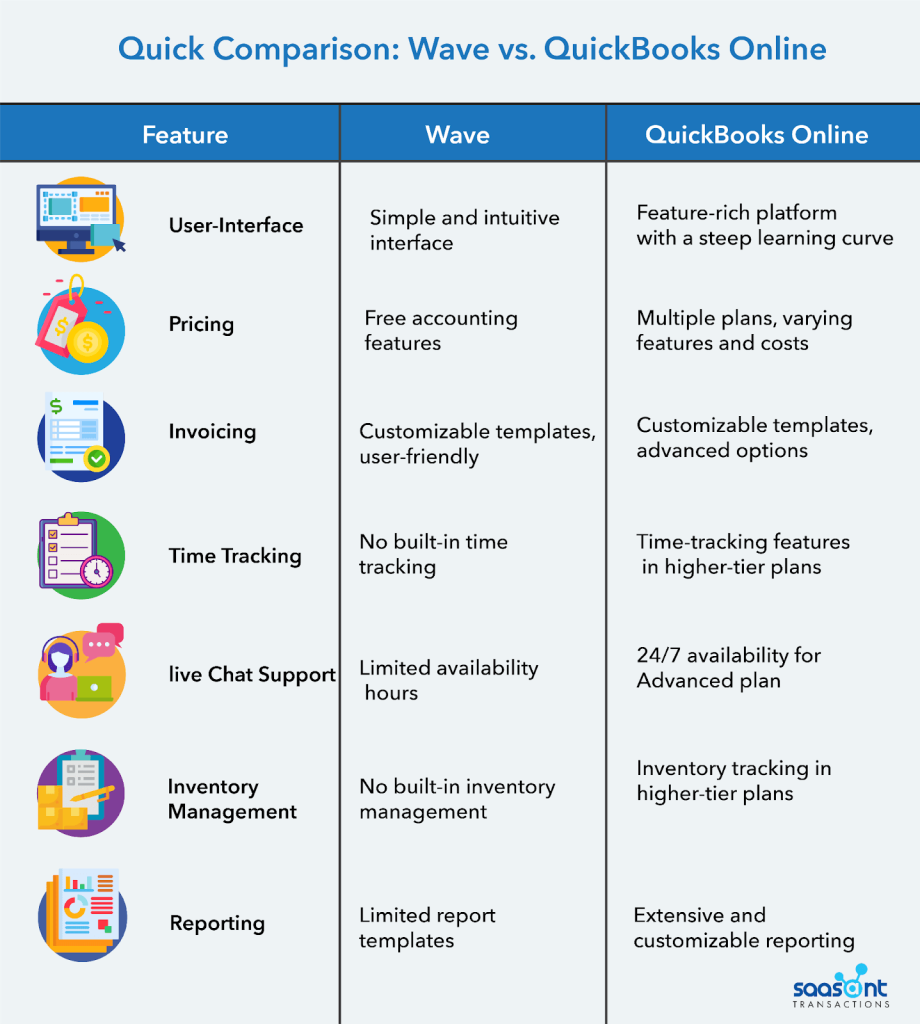
Choosing the right accounting software can feel like navigating a maze. You want something that fits your budget but also meets all your needs.
That’s where Wave Accounting and QuickBooks come in. Both offer free and paid options, but which one is right for you? You’ll discover the ins and outs of Wave Accounting vs QuickBooks. We’ll break down the features, costs, and benefits of each to help you make an informed decision.
Whether you’re a small business owner or a freelancer managing your own books, understanding these tools can save you time and money. Stay with us as we explore how these platforms can streamline your financial tasks and help your business thrive. You’ll find out which option aligns with your goals, ensuring you make the best choice for your accounting needs.
Wave Accounting Features
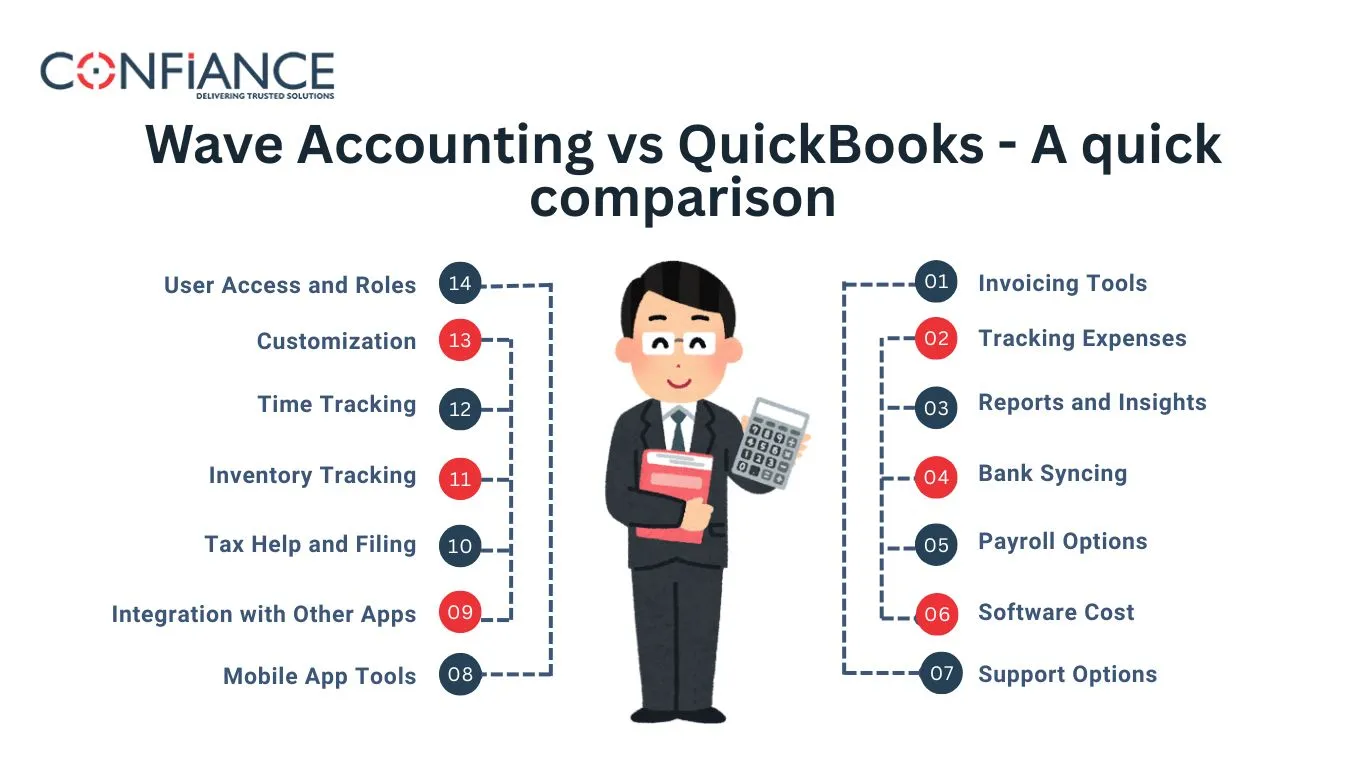
Wave Accounting is a popular choice for small business owners. It’s known for its user-friendly features and cost-effective solutions. These features make financial management easy and accessible. Let’s explore the main features of Wave Accounting.
User Interface And Accessibility
Wave Accounting offers a clean and intuitive interface. Users find it easy to navigate. The dashboard presents key financial data at a glance. It supports both desktop and mobile access. This ensures you can manage finances on the go. It’s designed for users of all skill levels.
Invoicing And Payments
Wave provides robust invoicing capabilities. You can create professional invoices quickly. Customizable templates make branding easy. Wave supports online payments, too. Clients can pay directly through the invoice. This improves cash flow efficiency. Automated reminders reduce late payments.
Expense Tracking Capabilities
Wave excels in tracking expenses. Users can connect their bank accounts. This allows automatic transaction import. You can categorize expenses easily. Wave generates clear reports on spending. This helps in budget planning and financial analysis. It’s a valuable tool for managing business costs.
Credit: confiancebizsol.com
Wave Accounting Free Vs Paid
Wave Accounting stands out with its free features for small businesses. Many users wonder about the differences between its free and paid options. Understanding these can help choose the right fit for your business needs.
Services Offered In Free Version
The free version of Wave Accounting offers many essential tools. Users can manage invoices, track expenses, and generate financial reports. It includes unlimited bank connections and receipt scanning. These features make it a great choice for startups and small businesses. The user-friendly interface ensures easy navigation for all. With no monthly fees, it is accessible to everyone.
Premium Features And Pricing
Wave offers premium services for those needing extra features. These include payroll and payment processing. Payroll services start at $20 per month. Payment processing charges a small fee per transaction. These services provide more control and flexibility for growing businesses. Wave’s premium features cater to those with specific needs. They are designed to enhance business operations efficiently.
Quickbooks Features
QuickBooks is a powerful tool that comes packed with features designed to streamline your accounting processes. Whether you’re a small business owner or managing a more extensive operation, understanding these features can help you make the most of your bookkeeping efforts. Let’s dive into some of the standout features of QuickBooks that could make your accounting tasks simpler and more efficient.
Dashboard And Navigation
The QuickBooks dashboard is your command center. It offers a clean, intuitive design that allows you to view your financial health at a glance. You can easily track income, expenses, and account balances, helping you stay on top of your finances without feeling overwhelmed.
Navigation is straightforward, with a sidebar that gives you quick access to various sections like invoicing, expenses, and reports. This streamlined interface means less time fumbling through menus and more time focusing on growing your business. Have you ever found yourself lost in an application? QuickBooks makes sure that doesn’t happen.
Billing And Receivables
Managing billing and receivables is crucial for cash flow, and QuickBooks excels here. You can create customized invoices in minutes, complete with your branding and payment terms. This not only helps you look professional but also speeds up the payment process.
QuickBooks also allows you to set up automatic reminders for overdue invoices, so you never have to awkwardly remind a client again. Imagine the relief of having one less thing to worry about. Additionally, you can accept online payments directly through invoices, making it convenient for both you and your clients.
Budgeting And Reporting Tools
QuickBooks offers robust budgeting and reporting tools that are essential for any business. You can set budgets for different categories and track how you’re performing against them. This helps you make informed decisions about where to cut costs or invest more.
The reporting tools provide insights into every aspect of your business. From profit and loss statements to cash flow analysis, QuickBooks gives you the data you need to make strategic decisions. Ever wonder where your money is really going? These reports lay it all out clearly.
Incorporating these features into your daily operations can significantly enhance your financial management. Which QuickBooks feature do you find most beneficial for your business?
Credit: missionaccountinghelp.com
Quickbooks Free Vs Paid
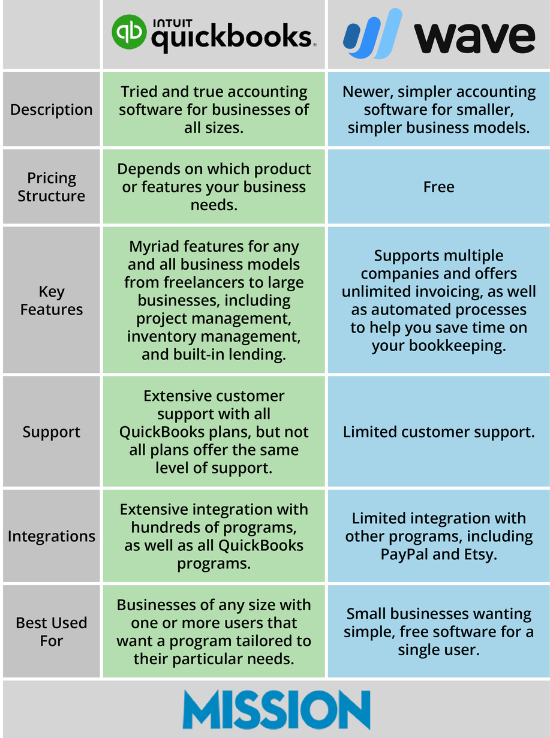
Wave Accounting offers free accounting tools suitable for small businesses. QuickBooks provides both free and paid options, catering to different business needs. Consider features and budget when choosing between Wave and QuickBooks solutions.
Choosing the right accounting software can make or break your business. QuickBooks offers both free and paid options, but how do you decide which is right for you? Let’s dive into the features and benefits of each to help you make an informed choice.Features In Free Plan
QuickBooks’ free plan gives you access to some essential tools. You can create and send invoices, track income and expenses, and even manage cash flow. However, you might find the limitations frustrating if your business grows or if you need more detailed financial reporting. The free plan is ideal for freelancers or small businesses with straightforward accounting needs. It offers a good starting point, but you may quickly outgrow its capabilities. Consider your future needs to determine if the free plan can truly serve your business in the long run.Advantages Of Paid Plans
QuickBooks paid plans unlock a treasure trove of features. With options like inventory tracking, advanced reporting, and even payroll management, your business can operate with more precision and efficiency. Imagine how much easier your life could be with automated tasks and real-time financial insights. Paid plans come with dedicated customer support, which can be a lifesaver during tax season or financial audits. If you’ve ever spent hours troubleshooting an issue on your own, you know how valuable expert help can be. Is the peace of mind worth the investment for you? Choosing between free and paid plans isn’t just about cost—it’s about value. What features will save you time and stress? What will help your business grow? By answering these questions, you’ll have a clearer path to the plan that suits your needs.Comparative Analysis
Choosing the right accounting software can be challenging. Many businesses weigh options between Wave Accounting and QuickBooks. Each offers unique features, free and paid plans. Understanding the differences helps in making an informed decision. Let’s explore their ease of use, pricing structures, and customer support.
Ease Of Use Comparison
Wave Accounting boasts a user-friendly design. It simplifies tasks for small businesses. QuickBooks offers a more comprehensive interface. It may require some learning but offers greater functionality. Both platforms cater to different user needs.
Pricing Structures Compared
Wave Accounting provides free core features. It’s ideal for startups with limited budgets. QuickBooks offers tiered pricing plans. Users can choose based on their business needs. Paid plans unlock advanced features. Consider your budget and requirements carefully.
Customer Support Options
Wave Accounting offers email support for free users. Paid users can access live chat options. QuickBooks provides phone support and online resources. Users can also find answers in community forums. Support is crucial for resolving any issues quickly.
Credit: www.globalfpo.com
Best Fit For Different Businesses
Choosing the right accounting software is crucial for the success of your business. With options like Wave Accounting and QuickBooks, it can be challenging to determine which is the best fit. This decision often depends on the size and needs of your business, as well as how much you’re willing to spend.
Considerations For Small Businesses
As a small business owner, every penny counts. Wave Accounting offers a comprehensive suite of free tools that are ideal for businesses with limited budgets. You get access to invoicing, accounting, and receipt scanning at no cost, which makes it easier to manage your finances without breaking the bank.
QuickBooks, on the other hand, provides a free trial to test its features but typically requires a subscription for its full range of services. If you’re considering QuickBooks, think about the features that are most important to you. Do you need advanced reporting or inventory management? If not, Wave might be all you need.
Benefits For Larger Enterprises
Larger businesses often have more complex accounting needs. QuickBooks offers scalable solutions with robust features like project management and in-depth financial reporting. These tools can help you gain insights into your business performance and make informed decisions.
Wave might not offer the same level of sophistication. However, it can still be a great option if you’re looking to manage basic finances while using other tools for advanced needs. It’s important to evaluate whether the extra features in QuickBooks justify the cost for your larger enterprise.
Ultimately, the choice between Wave Accounting and QuickBooks should align with your business goals and financial capacity. Have you considered what specific problems you want your accounting software to solve? Reflect on your priorities and choose the software that best addresses them.
Frequently Asked Questions
Is Wave Accounting Better Than Quickbooks?
Wave Accounting is ideal for small businesses needing free software. QuickBooks offers more features suitable for larger businesses. The choice depends on your budget and feature requirements. Both have unique strengths, so assess your business needs to decide which suits you best.
What Are The Drawbacks Of Wave Accounting?
Wave Accounting lacks phone support, which may frustrate some users. It also offers limited integration options with third-party apps. Advanced features, like project tracking, are absent. The mobile app has fewer functionalities compared to the desktop version. Businesses needing complex accounting may find it insufficient.
Is Wave Accounting Really Free?
Wave Accounting offers free accounting software for small businesses. Users can access invoicing, receipt scanning, and accounting features at no cost. Payment processing and payroll services require additional fees. Overall, the core accounting features remain free, making it a budget-friendly option for entrepreneurs.
Why Do Accountants Not Like Quickbooks Online?
Accountants often dislike QuickBooks Online due to limited reporting capabilities and customization options. The platform can be slow and lacks advanced features needed for complex accounting tasks. Some find the user interface unintuitive, impacting efficiency. Compatibility issues with other software are also a common concern among professionals.
Conclusion
Choosing between Wave Accounting and QuickBooks depends on your needs. Wave offers great free features for small businesses. QuickBooks provides both free and paid options. It suits growing businesses with complex needs. Consider your budget and business size. Evaluate the features you require.
Both platforms have unique strengths. Easy integration and user-friendly interfaces are key benefits. Think about the support you might need. Free options are budget-friendly but may lack advanced tools. Paid versions often offer more features and support. Make an informed choice for your business success.
