
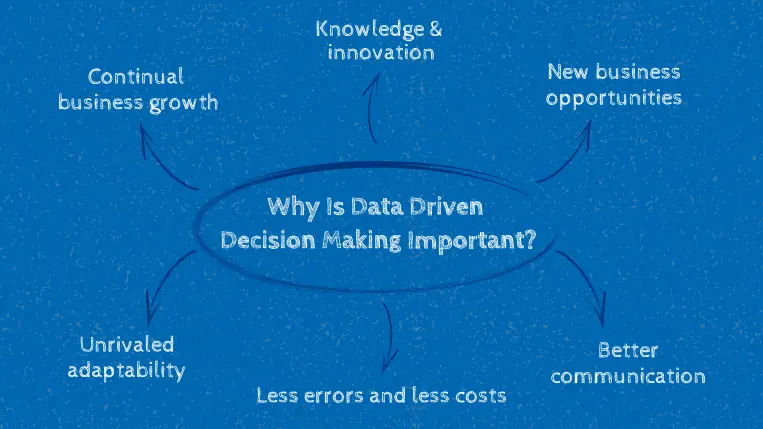
Are you ready to supercharge your decision-making process? Imagine having the power to transform raw data into actionable insights effortlessly.
The secret lies in choosing the right business intelligence tools. With countless options out there, finding the perfect fit for your needs can be overwhelming. But don’t worry—we’ve done the hard work for you. This article will reveal the top business intelligence tools that are revolutionizing data-driven decisions.
Whether you’re looking to streamline operations, boost profits, or gain a competitive edge, these tools will empower you to make smarter choices faster. Dive in and discover how to harness the full potential of your data. Your next breakthrough is just a few clicks away.
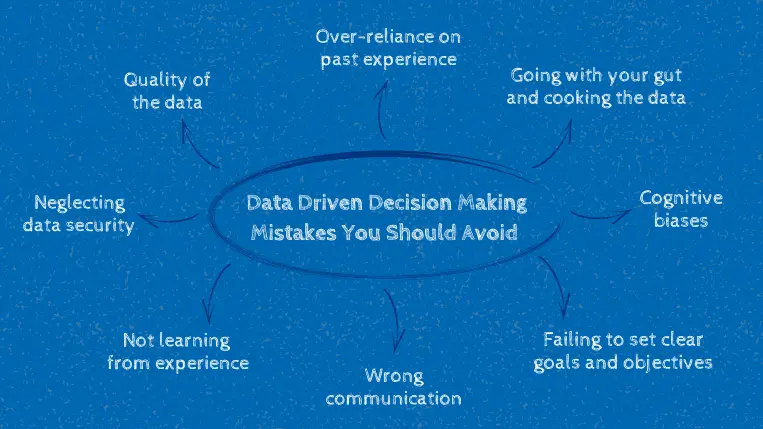
Credit: www.rib-software.com
Power Bi
Power BI stands among the top business intelligence tools, enabling data-driven decision-making with its interactive dashboards. Users can easily transform data into insights, fostering informed choices.
Power BI is a leading business intelligence tool crafted by Microsoft. Designed for data-driven decision-making, it transforms raw data into insightful reports and dashboards. With its intuitive interface, Power BI allows users to visualize and analyze data effortlessly. It caters to businesses of all sizes, streamlining operations and enhancing performance.Key Features
Power BI offers robust data visualization capabilities. Users can create interactive reports with stunning charts and graphs. The tool supports natural language queries, making data exploration simple. Advanced analytics features like AI-driven insights help uncover trends. It also provides real-time dashboards for tracking live data.User Experience
Power BI boasts an easy-to-navigate interface. Drag-and-drop functionality simplifies report creation. Beginners and experts alike find it user-friendly. Tutorials and guides support new users in getting started. Customizable dashboards allow personalized data views.Integration Capabilities
Power BI integrates seamlessly with various data sources. It connects to Excel, SQL databases, and cloud services. Users can import data from multiple platforms with ease. The tool supports integration with Microsoft products like Azure. Third-party service connections expand its versatility.Pricing Model
Power BI offers flexible pricing to suit different needs. A free version is available with limited features. The Pro version unlocks advanced capabilities for a monthly fee. Enterprise solutions provide additional functionalities for larger businesses. Pricing depends on the number of users and desired features.Tableau
Tableau is a powerful business intelligence tool that has gained immense popularity for its ability to turn data into actionable insights. If you’ve ever felt overwhelmed by the sheer volume of data available, Tableau might be the solution you need. It’s designed to help you visualize and understand your data better, making it easier to make informed decisions.
Visualization Strengths
Tableau’s visualization capabilities are one of its standout features. Imagine being able to transform complex data sets into clear, interactive charts and graphs. The tool offers a wide array of visualization options, from bar charts to heat maps, allowing you to see trends and patterns that might otherwise be hidden.
Have you ever tried to decipher a spreadsheet with thousands of rows? With Tableau, you can convert this data into a visually appealing format that is easy to interpret. Seeing data represented visually often leads to those “aha” moments, where insights become obvious.
Ease Of Use
Tableau is known for its user-friendly interface, making it accessible even to those who aren’t data experts. You don’t need to be a tech whiz to navigate Tableau; its drag-and-drop functionality simplifies the process. It’s like creating a puzzle, but with data pieces that fit perfectly together.
As someone who once struggled with complex data tools, I found Tableau refreshing in its simplicity. You can easily build dashboards and reports without needing extensive training. This ease of use encourages more frequent and effective data analysis.
Customizability
One of the great things about Tableau is its customizability. You can tailor your dashboards to reflect the exact information you need. Whether you want to focus on sales trends or customer demographics, Tableau allows you to customize your visuals accordingly.
Think about the flexibility this offers. You can adjust settings and filters to highlight the most pertinent data for your business. Customization ensures your dashboards are not only informative but relevant to your specific needs.
Community And Support
Tableau boasts a robust community and support system. Have you ever felt stuck while using a tool? With Tableau, you have access to a wealth of resources, including forums, tutorials, and webinars. You’re never alone when facing a challenge.
The Tableau community is active and eager to help. Whether you’re troubleshooting an issue or seeking advice on best practices, there’s always someone willing to share their expertise. This support network can be invaluable, especially when exploring new features.
Incorporating Tableau into your business intelligence strategy could be the game-changer you’ve been looking for. What’s stopping you from taking your data analysis to the next level?
Qlik Sense
Qlik Sense stands out as a leading business intelligence tool for data-driven decisions. It offers user-friendly data visualization and analytics. Ideal for businesses seeking clear insights from complex data.
Qlik Sense is a powerful business intelligence tool that empowers you to make data-driven decisions with confidence. Its intuitive design and robust features ensure that even those new to data analytics can extract meaningful insights. Whether you’re a seasoned analyst or just starting your data journey, Qlik Sense offers tools that can transform raw data into actionable knowledge.Associative Engine
The heart of Qlik Sense is its associative engine. Unlike traditional linear models, this engine allows you to explore data in any direction. Imagine quickly discovering hidden insights by simply clicking through data points, revealing connections you might have missed. How often have you found yourself wishing you could see the bigger picture? With Qlik Sense, you can link different data sets effortlessly. This means a more comprehensive view and smarter decision-making.Self-service Analytics
Qlik Sense champions self-service analytics, putting the power directly into your hands. You don’t need to rely on IT specialists to generate reports. Instead, you can create your own visualizations and dashboards with a few clicks. This freedom empowers you to explore data at your own pace. If you’ve ever felt limited by pre-set reports, Qlik Sense opens up a world of possibilities. The ability to customize your analytics experience ensures that your insights are as unique as your business needs.Security Features
Security is a top priority in Qlik Sense, ensuring your data remains safe and confidential. With robust security features, you can control who sees what. Role-based access ensures that sensitive information is only available to those who need it. Have you ever worried about data breaches? Qlik Sense’s advanced security protocols give you peace of mind. Knowing your data is protected allows you to focus on what truly matters—making informed decisions.Deployment Options
Flexibility in deployment is another strength of Qlik Sense. Whether you prefer on-premise solutions, cloud-based services, or a hybrid approach, Qlik Sense adapts to your needs. This means you can scale as your business grows without any hassle. Have you considered how deployment affects your business’s agility? With Qlik Sense, you can choose the option that best suits your infrastructure and strategic goals. This flexibility ensures that your BI tool grows alongside your business, supporting your evolving needs.Looker
Looker is a leading business intelligence tool. It helps organizations make data-driven decisions. With Looker, explore data in depth and visualize insights effectively. This tool is part of Google Cloud, offering seamless integration. Looker’s intuitive interface makes it accessible for users of all levels.
Data Exploration
Looker offers powerful data exploration capabilities. Users can dive deep into datasets. They can filter, drill down, and customize views. This makes data analysis straightforward. Discover trends and patterns without complex queries.
Real-time Dashboards
Looker provides real-time dashboards. These offer up-to-the-minute insights. Monitor business metrics as they happen. Customize dashboards to suit business needs. Enhance decision-making with timely data.
Collaboration Tools
Looker includes robust collaboration features. Share insights across teams easily. Discuss findings directly within Looker. Align team efforts with shared data insights. Foster a collaborative data culture.
Google Cloud Integration
Looker integrates smoothly with Google Cloud. Leverage the power of cloud computing. Access and analyze data stored in Google Cloud. Improve efficiency with seamless data handling. Benefit from Google’s scalable infrastructure.
Sap Businessobjects
SAP BusinessObjects stands as a significant tool in business intelligence. It offers robust features for data-driven decision-making. Trusted by many enterprises globally, it delivers insightful analytics and reports.
Comprehensive Reporting
SAP BusinessObjects excels in providing detailed reports. Users can create custom dashboards to visualize data clearly. It supports various formats for presenting data effectively. The tool simplifies complex data into understandable insights. Users benefit from accurate and timely reports.
Enterprise Scalability
This tool adapts to the growing needs of businesses. It handles large data volumes without compromising performance. SAP BusinessObjects supports both small and large enterprises. Its architecture ensures smooth operations as the business expands.
Data Connectivity
Connecting different data sources is easy with SAP BusinessObjects. It integrates with various databases and systems. Users access data from multiple platforms seamlessly. This connectivity enhances data analysis and decision-making processes.
Cost Considerations
Investing in SAP BusinessObjects involves financial planning. Costs vary based on business size and needs. Enterprises must consider long-term benefits against initial expenses. Careful budgeting helps maximize the tool’s advantages.
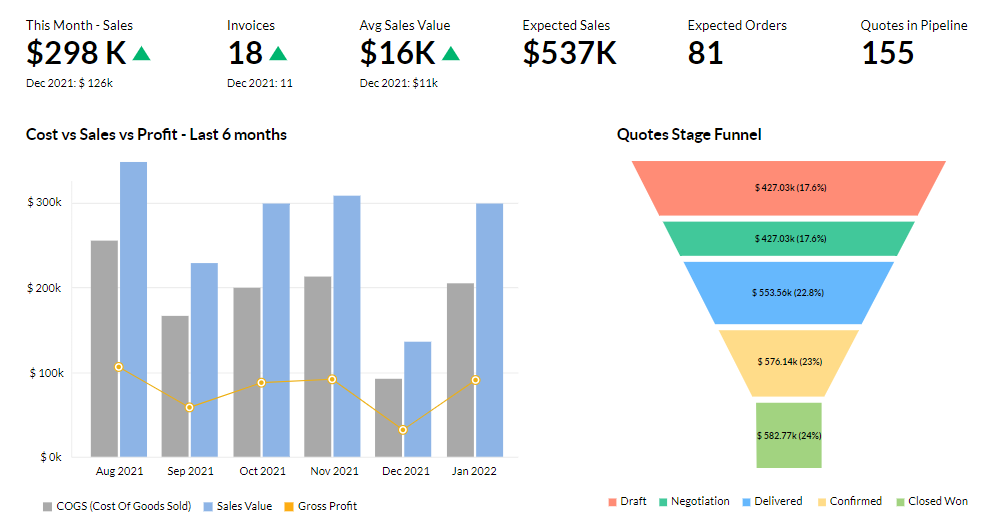
Credit: www.altexsoft.com
Domo
Domo stands out as a top business intelligence tool for data-driven decision-making. Its user-friendly interface simplifies complex data analysis. Real-time insights empower businesses to make informed choices quickly and effectively.
Domo stands out in the business intelligence world. It’s a comprehensive tool for data-driven decision-making. Businesses of all sizes use Domo to harness data insights. Its user-friendly interface ensures even beginners can navigate with ease. Let’s delve into what makes Domo a top choice.Cloud-based Platform
Domo operates entirely in the cloud. This means no hardware installations. You can access it from anywhere with an internet connection. It offers real-time data updates. Businesses can make swift decisions without waiting for data synchronization. The cloud-based nature ensures scalability. As your business grows, Domo grows with you.Mobile Accessibility
Domo ensures you stay connected on the go. Its mobile app is intuitive and easy to use. Access reports and dashboards from your smartphone. Respond to data insights immediately. Mobile accessibility keeps you informed, even during travel. You’re never out of touch with your data.Data Visualization
Data visualization is a key feature of Domo. It transforms complex data into easy-to-understand visuals. Use charts, graphs, and maps to display insights. Visuals help in identifying trends and patterns quickly. This makes data analysis straightforward and effective. Even non-experts can understand data stories.Collaboration Features
Domo promotes teamwork through its collaboration tools. Share insights and reports with colleagues seamlessly. Discuss data findings within the platform. Foster a collaborative environment for better decision-making. Everyone stays on the same page. This ensures alignment in business strategies. Collaboration leads to informed and collective decisions.Sisense
Sisense stands out as a powerful business intelligence tool, enabling data-driven decisions through intuitive dashboards. Its user-friendly interface simplifies complex data analysis, making insights accessible to businesses of all sizes. Gain valuable insights with Sisense to enhance decision-making processes effectively.
In the realm of Business Intelligence (BI) tools, Sisense stands out as a robust platform designed for data-driven decision-making. It empowers businesses to transform complex data into actionable insights with ease. Known for its user-friendly interface and powerful analytics capabilities, Sisense is an excellent choice for organizations aiming to leverage data effectively.In-chip Technology
Sisense’s in-chip technology is a game-changer for data processing. Unlike traditional methods that rely heavily on RAM, this technology optimizes CPU cache, accelerating data processing speeds. This means you can analyze large data sets faster, making real-time decision-making possible. Imagine being able to quickly sift through vast amounts of data without waiting for hours. This is the kind of efficiency Sisense’s in-chip technology offers. It’s like having a superpower for your data needs.Embedded Analytics
Sisense provides seamless embedded analytics that integrate directly into your existing apps. This feature allows you to enhance your software offerings without building analytics from scratch. Your users can access real-time data insights directly within the platforms they already use. Consider how this could improve user engagement and satisfaction. By embedding analytics, you provide value-added services that keep your users coming back. It’s all about making data accessible where your users need it most.Scalability
Scalability is a critical factor for growing businesses, and Sisense excels in this area. As your data needs expand, Sisense scales effortlessly to accommodate larger data volumes and more users. This ensures that your analytics capabilities can grow in tandem with your business. Think about your long-term goals and how Sisense can support your growth journey. You won’t be limited by your analytics tool, giving you the freedom to expand without worry.Customer Support
Excellent customer support is one of the cornerstones of a great BI tool, and Sisense delivers on this front. Their support team is known for being responsive and helpful, ensuring that you can overcome any technical hurdles quickly. Reflect on a time when you needed immediate help and how valuable responsive support was. With Sisense, you’re not just getting a tool; you’re gaining a partner committed to your success. Choosing the right BI tool is crucial, and Sisense offers compelling features that cater to various business needs. Whether you’re prioritizing speed, seamless integration, scalability, or support, Sisense provides a comprehensive solution to empower your decision-making process.
Credit: online.hbs.edu
Ibm Cognos Analytics
IBM Cognos Analytics is a leading tool for business intelligence, enabling data-driven decision-making. It offers user-friendly dashboards and insightful reports, making data analysis accessible and clear. Perfect for businesses seeking to understand their data better.
IBM Cognos Analytics stands out as a robust tool for data-driven decisions. It offers a comprehensive platform to explore data insights with ease. Businesses can harness its power for smarter analytics and reporting. With its user-friendly interface, it caters to both beginners and experts alike. IBM Cognos Analytics is all about turning raw data into actionable intelligence.Ai-driven Insights
IBM Cognos Analytics leverages AI to uncover hidden patterns in data. It provides insights that help businesses make informed decisions quickly. The AI capabilities simplify data interpretation for users of all expertise levels. This feature ensures that even complex data is accessible and understandable.Data Preparation
Data preparation with IBM Cognos Analytics is straightforward. Users can clean and organize data without hassle. The platform automates many data prep tasks, saving time. It enables users to focus more on analysis rather than data cleaning. This efficiency boosts productivity and data accuracy.Integration With Ibm Cloud
IBM Cognos Analytics integrates seamlessly with IBM Cloud. This integration enhances data accessibility and security. Users can access data from anywhere with internet connectivity. The cloud-based approach ensures scalability and flexibility for growing businesses. It supports a collaborative environment for teams across different locations.Licensing Options
IBM Cognos Analytics offers flexible licensing options. Businesses can choose plans that align with their needs and budgets. Whether small or large, companies find suitable solutions. The licensing options ensure scalability as business needs evolve. This flexibility makes it a valuable choice for diverse organizations.Microstrategy
MicroStrategy stands out as a powerful business intelligence tool. Known for its robust analytics capabilities, it helps businesses make informed decisions. From small startups to large enterprises, it offers solutions that cater to diverse needs. With an emphasis on user-friendly interfaces, it’s suitable for users at any tech skill level. Let’s explore some key features of MicroStrategy.
Enterprise-grade Solutions
MicroStrategy provides solutions that meet the demands of large businesses. Its platform supports complex data analysis and scalability. Users can manage vast datasets efficiently. This makes it suitable for enterprises needing detailed insights. The platform’s architecture ensures reliability and performance.
Mobile Analytics
With MicroStrategy, data access is possible on the go. Its mobile analytics feature allows users to access insights from anywhere. The mobile interface is intuitive and user-friendly. Users can view dashboards and reports on their devices. This ensures decision-makers stay informed, even on the move.
Data Security
Data security is a priority for MicroStrategy. The platform offers robust security features to protect sensitive information. Users can set permissions for data access and usage. This ensures only authorized personnel can view or edit data. These security measures safeguard against data breaches.
Flexible Deployment
MicroStrategy offers flexible deployment options to suit various needs. Users can choose between on-premise, cloud, or hybrid solutions. This flexibility allows businesses to select what fits their infrastructure. Each option ensures smooth integration with existing systems. This adaptability makes MicroStrategy a versatile choice for many organizations.
Key Considerations For Selection
Selecting the right business intelligence tools involves assessing data integration capabilities and user-friendly interfaces. Consider scalability and support options to ensure smooth operations. Evaluate pricing models to fit budget constraints.
Choosing the right business intelligence (BI) tool is crucial for making informed, data-driven decisions. However, with so many options available, it can be daunting to identify which tool best fits your needs. By focusing on a few key considerations, you can streamline your decision-making process and select a tool that aligns perfectly with your business objectives.Business Needs Alignment
Your BI tool should align with your specific business needs. Think about the types of data you regularly analyze and the insights you aim to gain. For example, if your business relies heavily on real-time data for quick decision-making, ensure the tool offers robust real-time analytics features.Budget Constraints
Budget is a major factor in tool selection. While it’s tempting to opt for the most feature-rich tool, it’s essential to choose a tool that offers a balance between cost and functionality. Consider the long-term costs, including potential upgrades or additional user licenses.Scalability And Flexibility
As your business grows, your BI tool should be able to grow with you. A scalable tool can handle increasing data volumes and user numbers without compromising performance. Flexibility is also crucial; the tool should adapt to changing business environments and integrate with other systems you may adopt in the future.User Training And Support
Even the most advanced BI tool is ineffective if your team cannot use it efficiently. Consider the availability of training resources and support services. It’s beneficial to choose a provider that offers comprehensive training sessions and responsive customer support to help your team maximize the tool’s potential. Selecting the right BI tool is not just about features or price. It’s about understanding how the tool will fit into your business landscape now and in the future. What are your specific needs, and how does the tool you’re considering meet them?Frequently Asked Questions
What Are The Top Business Intelligence Tools?
Top business intelligence tools include Tableau, Power BI, and QlikView. These tools help businesses analyze data efficiently. They offer user-friendly interfaces and robust analytics capabilities. Choosing the right tool depends on specific business needs and budget.
How Do Bi Tools Aid Decision Making?
BI tools provide insights from data to support decision making. They help identify trends and patterns. With visual dashboards and reports, they make data interpretation easier. This enables businesses to make informed and timely decisions.
Why Is Data-driven Decision Making Important?
Data-driven decision making improves accuracy and efficiency. It minimizes guesswork and relies on factual data. This approach helps companies adapt quickly to market changes. Ultimately, it leads to better strategic planning and competitive advantage.
Which Bi Tool Is Best For Beginners?
For beginners, Microsoft Power BI is highly recommended. It’s user-friendly and integrates well with other Microsoft products. It offers a free version with ample features. Power BI’s intuitive design makes it easy to create reports and dashboards.
Conclusion
Choosing the right business intelligence tool can transform decision making. These tools help you understand data better. They bring clarity and insight to complex information. With the right tool, decisions become informed and effective. This can lead to better results and improved efficiency.
Each tool offers unique features for different needs. It’s important to consider your business goals when selecting. Make sure to assess your needs and resources. Start exploring these tools today. See how they can support your business growth. Your data holds potential; unlock it with the right tool.
