
Are you tired of the endless paper chase for signatures that eats up your time and budget? Imagine transforming this cumbersome task into a seamless, digital process that not only saves you time but also complies with stringent legal standards.
Meet QuickSigner, your new best friend in the realm of e-signatures. Designed specifically for small-business owners and solopreneurs, QuickSigner offers a robust, secure, and user-friendly platform to collect legally binding electronic signatures with ease. In this comprehensive review of the Quicksigner Lifetime Deal, we’ll explore how this tool can revolutionize the way you manage your documents. From its powerful features like real-time tracking and Adobe-certified signatures to its unbeatable lifetime pricing, QuickSigner promises to streamline your workflow and enhance your business operations. Curious about how this tool can fit into your business model and save you costs? Let’s dive in and uncover the full potential of QuickSigner.
Credit: www.youtube.com
Introduction To Quicksigner And Its Purpose
In the digital age, collecting legally binding e-signatures is essential for businesses. QuickSigner is designed to simplify this process. It provides a secure, efficient way to manage document signing. This tool caters to small-business owners and solopreneurs, ensuring legal compliance.
What Is Quicksigner?
QuickSigner is an e-signature tool that helps businesses collect electronic signatures. It supports any PDF file, including contracts, NDAs, and invoices. With QuickSigner, users can customize their documents using templates and manage multiple signers with ease. The tool offers unlimited document signing capabilities, ensuring seamless workflows.
The Need For Seamless Signing Solutions
Seamless signing solutions save time and reduce costs. Businesses need tools that streamline document workflows and provide full audit trails. QuickSigner meets these needs with its user-friendly interface. It offers robust security features like two-factor authentication and complies with US and EU legal standards.
QuickSigner utilizes PAdES technology for ISO/IEC 27001-certified signatures. Real-time tracking allows users to monitor who has signed documents. These features ensure a secure and efficient signing process for every user.
| License Tier | Sign Requests/Month | Users | Templates | Signers/Request | Documents/Request | Max Document Size | API Credits |
|---|---|---|---|---|---|---|---|
| License Tier 1 | 100 | 2 | 10 | 10 | 3 | 15 MB | None |
| License Tier 2 | 500 | 5 | Unlimited | 50 | 10 | 25 MB | 100 |
| License Tier 3 | Unlimited | 20 | Unlimited | 100 | 30 | 25 MB | 500 |
- 60-day money-back guarantee for all purchases.
- Licenses must be activated within 60 days.
- Users can upgrade or downgrade tiers within 60 days.
- Covered by AppSumo’s “We Got Your Back” guarantee.
Key Features Of Quicksigner
QuickSigner offers a range of features that make electronic signature collection efficient and secure. Designed for small-business owners and solopreneurs, this tool ensures legally binding e-signatures with full legal compliance. Below are the key features that set QuickSigner apart in the e-signature niche.
User-friendly Interface: Simplifying The Signing Process
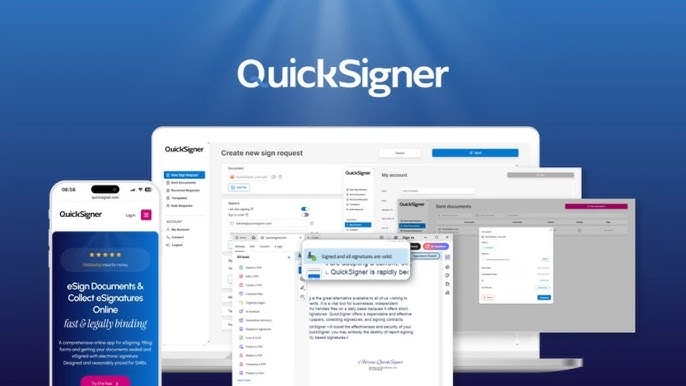
QuickSigner boasts an intuitive interface that simplifies the signing process. Users can easily upload any PDF file, including contracts, NDAs, and invoices. The platform supports multiple signers with a customizable signing order, allowing for seamless document management. Document customization with templates further enhances usability, making the signing process straightforward and efficient.
Advanced Security Measures: Ensuring Document Safety
Security is a top priority with QuickSigner. The platform implements robust security features such as two-factor authentication and PAdES technology for ISO/IEC 27001-certified signatures. These measures guarantee the safety and integrity of your documents. With real-time tracking, users can monitor who has signed, ensuring transparency throughout the signing process.
Multi-platform Accessibility: Sign Anytime, Anywhere
QuickSigner provides multi-platform accessibility, allowing users to sign documents anytime, anywhere. Whether you’re on a desktop, tablet, or smartphone, QuickSigner ensures your documents are accessible. This flexibility helps small-business owners and solopreneurs manage their workflows efficiently, adapting to various work environments.
Integration Capabilities: Enhancing Workflow Efficiency
QuickSigner enhances workflow efficiency through its integration capabilities. Users can integrate QuickSigner with existing platforms to streamline document workflows. The service offers unlimited document signing capabilities and supports multiple users, enabling businesses to handle large volumes of signatures without hassle.
| License Tier | Monthly Sign Requests | Users | Templates | Signers per Request | API Credits |
|---|---|---|---|---|---|
| Tier 1 | 100 | 2 | 10 | 10 | None |
| Tier 2 | 500 | 5 | Unlimited | 50 | 100 |
| Tier 3 | Unlimited | 20 | Unlimited | 100 | 500 |
Pricing And Affordability Breakdown
Understanding the pricing for QuickSigner is crucial for small-business owners. This e-signature tool offers flexibility with its lifetime deal. By paying once, users can avoid recurring costs. Let’s explore the details.
Understanding The Lifetime Deal Offer
QuickSigner’s lifetime deal offers three distinct license tiers. Each tier caters to different business needs. Here’s a breakdown:
| License Tier | Price | Sign Requests | Users | Templates | Signers per Request | Max Document Size |
|---|---|---|---|---|---|---|
| Tier 1 | $39 | 100 per month | 2 | 10 | 10 | 15 MB |
| Tier 2 | $99 | 500 per month | 5 | Unlimited | 50 | 25 MB |
| Tier 3 | $199 | Unlimited | 20 | Unlimited | 100 | 25 MB |
Each tier includes specific features. Users can upgrade within 60 days. The AppSumo guarantee provides a 60-day money-back option. This makes QuickSigner a risk-free investment.
Cost-effectiveness Compared To Monthly Subscriptions
Traditional e-signature tools often charge monthly fees. QuickSigner offers a significant saving opportunity. Here’s how:
- No recurring payments: Pay once, use forever.
- Higher sign requests: More requests for less money.
- Scalability: Easily upgrade to a higher tier.
Consider the benefits. With a one-time fee, businesses save in the long run. Compare monthly fees of other services. QuickSigner provides more value. It’s a cost-effective solution.
Pros And Cons Of Quicksigner
QuickSigner offers a comprehensive solution for collecting e-signatures. Users appreciate its efficiency and security. Yet, like any tool, it has both strengths and areas needing improvement. Understanding these aspects can help users make informed decisions.
Advantages: What Users Love About Quicksigner
- Legally binding e-signatures: Users trust QuickSigner for secure, compliant signatures.
- Supports any PDF file: Easily handle contracts, NDAs, and invoices.
- Unlimited document signing: No cap on the number of documents you can sign.
- Document customization: Use templates for personalized document management.
- Real-time tracking: Monitor document status promptly.
- User-friendly interface: Navigate with ease.
- Adobe-certified signatures: Ensures high standards in signature security.
- PAdES technology: Offers ISO/IEC 27001-certified signatures.
- Cost-effective: Reduces business expenses with lifetime access pricing.
- Strong security features: Includes two-factor authentication and bulk sending.
- Refund policy: 60-day money-back guarantee offers peace of mind.
Drawbacks: Areas For Improvement
- User limit: License Tier 1 allows only 2 users, which might be restrictive.
- Limited API credits: Tier 1 lacks API credits, restricting integration options.
- Document size constraint: Maximum document size of 15 MB in Tier 1 might limit usage.
- Activation period: Licenses need activation within 60 days, which may pressure new users.
- Tier differences: Higher tiers offer more features but at increased cost.
- Intended for new users: Existing account holders cannot utilize the lifetime deal.
Recommendations For Ideal Users Or Scenarios
QuickSigner provides an efficient solution for collecting legally binding e-signatures. Designed for small-business owners and solopreneurs, it streamlines document workflows. This tool is perfect for those who need secure and compliant document management. Various scenarios benefit from QuickSigner’s features, offering flexibility and ease.
Best Use Cases For Quicksigner
- Contract Management: Easily manage contracts with customizable signing orders.
- Non-Disclosure Agreements (NDAs): Securely gather signatures for confidentiality agreements.
- Invoices: Send invoices for signature, ensuring prompt payments.
- Document Customization: Use templates for efficient document handling.
- Real-time Tracking: Monitor the signing process in real-time.
Who Will Benefit The Most?
| User Type | Benefits |
|---|---|
| Small Business Owners | Saves time and reduces costs with unlimited document signing. |
| Solopreneurs | Streamlines workflows with user-friendly interface. |
| Legal Teams | Ensures compliance with US and EU legal standards. |
| Remote Teams | Facilitates secure document handling with two-factor authentication. |
QuickSigner is tailored for businesses needing robust security features. The platform suits scenarios demanding multiple signers and efficient document management.

Credit: lifetimedealhub.net

Credit: www.notlilly.com
Frequently Asked Questions
What Is Quicksigner Lifetime Deal?
Quicksigner Lifetime Deal is a one-time purchase offer for Quicksigner’s digital signing solution. It allows users to access premium features without recurring fees. This deal is ideal for businesses seeking efficient and affordable digital signing tools.
How Does Quicksigner Improve Signing Efficiency?
Quicksigner streamlines the signing process with its intuitive interface and advanced features. It automates document management and reduces time spent on manual tasks. Users benefit from quick and secure signing, enhancing overall productivity.
Is Quicksigner Secure For Sensitive Documents?
Yes, Quicksigner employs robust encryption and security protocols to protect documents. It ensures confidentiality and integrity during the signing process. Users can trust Quicksigner for handling sensitive information securely.
What Features Does Quicksigner Offer?
Quicksigner offers features like document tracking, customizable signing workflows, and integrations with popular tools. It supports various file formats and provides a user-friendly interface. These features make it a versatile solution for diverse business needs.
Conclusion
QuickSigner offers a practical solution for e-signature needs. Its features support small businesses efficiently. You enjoy secure, legally binding signatures with a user-friendly interface. Document management becomes easier and more efficient. Choose the right license tier based on your business needs. With real-time tracking, see who signed. QuickSigner ensures compliance with legal standards. Try it risk-free with a 60-day money-back guarantee. A reliable choice for solopreneurs and small businesses. For more details, visit the Quicksigner Lifetime Deal. Secure your documents today.
